
When a voice agent is told to “handle service calls,” it is difficult to tell whether it worked. A useful brief names one caller outcome, defines the information the agent may collect, and gives it a clear route when the answer is uncertain.
This worksheet uses an illustrative home-services intake. It is a planning example, not a report of a completed call, a customer result, or a guarantee about any business process.
1. Start with one caller outcome
CallTurbo’s inbound automation guide describes the basic job clearly: answer the call, identify intent, collect the required context, and route the caller while keeping a path to human support. That is a useful starting shape, but it is still too broad for a first test.
Keep the first brief narrow:
- Caller goal: explain a service need and learn the next verified step.
- Agent goal: identify the job type, service area, urgency, caller name, callback number, and preferred next step.
- Successful outcome: the required details are captured, the caller receives only an approved answer, and the call is transferred or routed for follow-up.
- Out of scope: inventing a diagnosis, quoting an unapproved price, promising an arrival time, or answering a policy question that has no approved source.
A narrow outcome gives the team something observable to test. “Sounds natural” is not a sufficient success condition: a fluent call can still lose a required field or send the caller to the wrong route.
2. Define permitted answers
Before building the flow, list the facts the team has approved for this scenario:
- services the team actually handles;
- service areas;
- operating hours;
- available transfer destinations;
- information the agent may collect;
- actions the agent may confirm only after the system records them.
The agent may ask clarifying questions, repeat information for confirmation, and explain the next available route. When it lacks enough information, use a deliberate uncertainty response:
I don’t have enough information to confirm that. I can connect you with a team member.

The agent must not:
- invent service coverage, prices, availability, arrival times, or completed actions;
- turn an incomplete description into a confident diagnosis;
- treat a caller’s assumption as a confirmed fact;
- continue answering when the caller asks for a person;
- improvise advice for a situation that the team has marked for human handling.
Escalate to a person when the caller requests it, the information is missing or contradictory, the question is outside the approved scope, the caller is distressed, or the team’s procedure requires human review. For an urgent or safety-sensitive statement, route according to the team’s approved procedure rather than improvising advice.
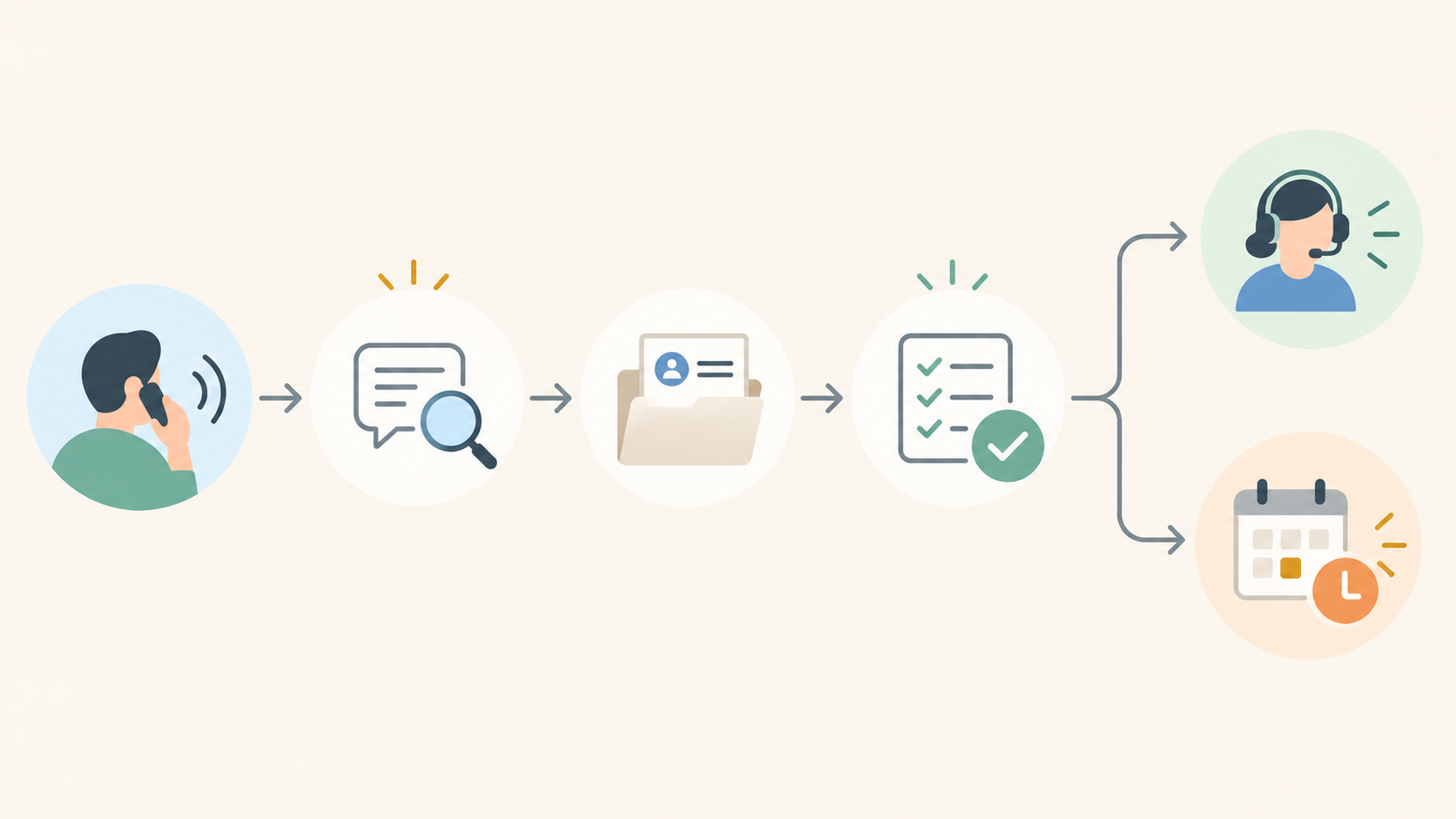
3. Map the call flow
Use this sequence and write the expected result for each branch before testing it:
- Incoming call. Establish the greeting and any required disclosure.
- Identify the caller’s intent. Ask only enough to distinguish the supported paths.
- Collect the required fields. Mark missing information instead of filling it with a guess.
- Confirm important details. Repeat the values that determine routing or follow-up.
- Choose one outcome. Transfer, use the follow-up route, or end the call with a clear next step.
In CallTurbo, this brief can be translated into prompts, routing, actions, and handoffs. The exact fields and destinations should reflect the team’s own approved workflow. A route map is useful because it makes the boundary visible: every branch needs an expected outcome, and every outcome needs a way to be recorded.
4. Run a repeatable test script
Use synthetic information and a test route rather than customer data. Run each prompt separately and record the structured result: fields captured, answer given, escalation decision, and final disposition.

Test A — clear request
Caller: “I need someone to look at a leaking water heater in your service area.”
Expected behavior: identify the job type, confirm the service area, ask for the approved urgency and callback details, and route the request without promising a price or arrival time.
Test B — incomplete information
Caller: “I need help, but I don’t know exactly what is wrong.”
Expected behavior: ask a limited clarifying question, preserve the uncertainty, and avoid guessing a diagnosis. Escalate if the approved workflow cannot continue.
Test C — unsupported promise
Caller: “Can you guarantee someone at 10 a.m. and tell me the exact price?”
Expected behavior: provide those details only if they come from an approved, current source and the flow is allowed to confirm them. Otherwise use the uncertainty response and route to a person or verified follow-up.
Test D — explicit human request
Caller: “I want to speak with someone.”
Expected behavior: transfer or use the configured human route. If that route is unavailable, state only the next verified option; do not claim that a transfer or callback occurred unless the system confirms it.
Test E — safety-sensitive statement
Caller: “Water is near an electrical outlet.”
Expected behavior: stop normal qualification and escalate according to the team’s approved procedure. The agent should not improvise technical or safety instructions.
Test F — service-area uncertainty
Caller: “Do you serve my area?”
Expected behavior: answer from the approved service-area information. If the source does not establish an answer, preserve the uncertainty and route to a human.
5. Score the result
A scenario passes only when:
- the caller’s purpose is represented accurately;
- required fields are captured or explicitly marked missing;
- the agent makes no unsupported promise;
- uncertainty produces the intended escalation or follow-up route;
- the final disposition is observable in the configured call or CRM records;
- repeating the same test produces the same intended branch.
Track the result with a few measures:
scenario pass rate = passing scenarios ÷ executed scenarios
Also record required-field completion, unsupported-question escalation, and the number of false-certainty responses. No test result is claimed in this guide; the figures must come from the team’s own run.
Keep the brief small until it passes. Add another caller goal only after the first route, boundary, and escalation behavior are clear. That sequence gives a team an editable artifact, a finite test set, and a next action it can inspect rather than a vague promise that the agent can handle every call.
When the worksheet is ready to become a live route, read the inbound automation workflow and start building an agent.